Pedigree Database
Unlock the Power of Your English Springer Spaniel's Pedigree!
Understanding your Springer’s lineage isn’t just about names on paper—it’s a vital tool for responsible ownership and breeding. Here’s why pedigree research matters:
Health & Longevity – Knowing your dog’s ancestry helps prevent inbreeding and identify potential hereditary health risks, ensuring healthier puppies and a stronger breed.
Breed Improvement – For sporting breeds like English Springer Spaniels, pedigrees highlight field trial champions, agility stars, and obedience standouts, helping you make informed breeding and training decisions.
Honoring Their Legacy – Your Springer’s pedigree connects them to generations of exceptional dogs and dedicated breeders who shaped the breed we love today.
This database is provided “as is” without liability. This pedigree database is carefully curated using AKC records and breeder contributions. While we strive for accuracy, occasional errors may occur. If you spot any discrepancies, please submit corrections via our Pedigree Submission page.
Keeping this resource up-to-date takes extra dedication and support. If you find value in this database, please consider making a donation to help maintain and expand this valuable tool for the Springer community. Every contribution helps us continue this important work!
Click the button below to donate today—thank you for supporting the future of the breed!
What's New?
Enhancements Behind the Scenes
While the website may appear new, significant improvements have been made to the underlying system, with ongoing feature development to enhance functionality.
Upgraded Database – Now utilizing MySQL for improved performance and faster response times.
Photo Integration – The option to add dog photos for customized pedigree printouts.
Expanded Customization – New fields can be added to enhance pedigree records.
Enhanced Print Formats – A wider variety of pedigree printout options, allowing for greater flexibility in display formats.
Using the new site:
Maximizing the Power of Search
This site features a robust and highly capable search function, designed to help you find exactly what you need with ease. To make the most of these powerful tools, it’s important to understand the key features available.
The following images and descriptions will guide you through the search process, ensuring you can navigate and utilize the system efficiently.
1. Searching:
How to Use the Pedigree Search Function
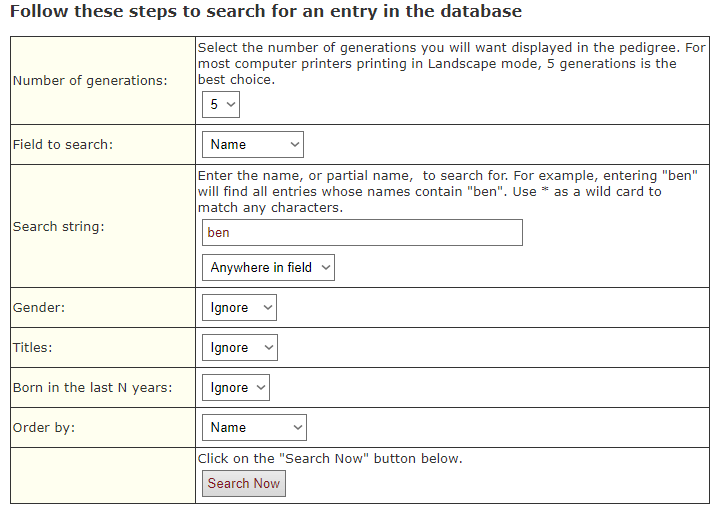
Follow these steps to efficiently navigate the pedigree software and refine your search results:
- Select Generations – Choose the number of generations to include in your search, ranging from 3 to 9.
- Customize Field Search – The search fields are flexible; refer to the next section for details on how to adjust them.
- Enter Search Criteria – Input the specific data you are looking for in the search string field, replacing the placeholder text.
- Filter by Gender – You can refine your search by selecting male or female, or leave this field blank to include all results.
- Use Dropdown Menus – Explore additional search options by selecting from the available dropdown menus.
- Run Your Search – Once all selections are made, click “Search” to generate your results.
By following these steps, you can maximize the effectiveness of the pedigree search and find the information you need quickly and efficiently.
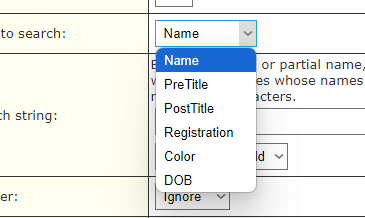
2. Searching under Field to Search:
Flexible Search Options
Our field search allows you to find pedigree information efficiently. You can search by:
Name – Locate a specific dog by entering its registered name.
Registration Number – Use the official number for precise results.
Color – Filter by coat color to refine your search.
Date of Birth (DOB) – Narrow results by selecting a birthdate range.
This flexible search system ensures quick and accurate access to the pedigree records you need.
3.Search String
Optimizing Your Search
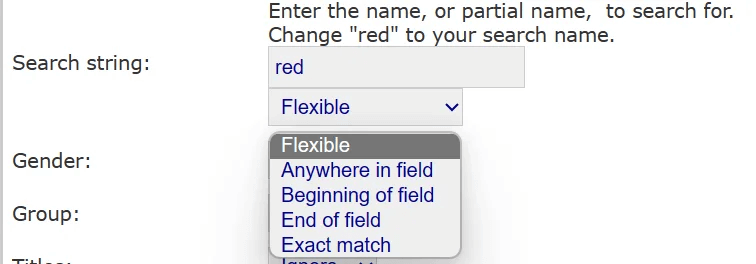
The search function offers flexibility to help you find the most accurate results. Using the “Flexible” setting provides the broadest search capability, while other options refine your results based on specific criteria:
Anywhere in the Field – Finds matches regardless of position within the entry.
Beginning of Field – Limits results to entries that start with your search term.
End of Field – Returns only entries that end with the specified term.
Exact Match – Displays results that precisely match your input.
Selecting the right search setting ensures you retrieve the most relevant information efficiently.
4. Results:
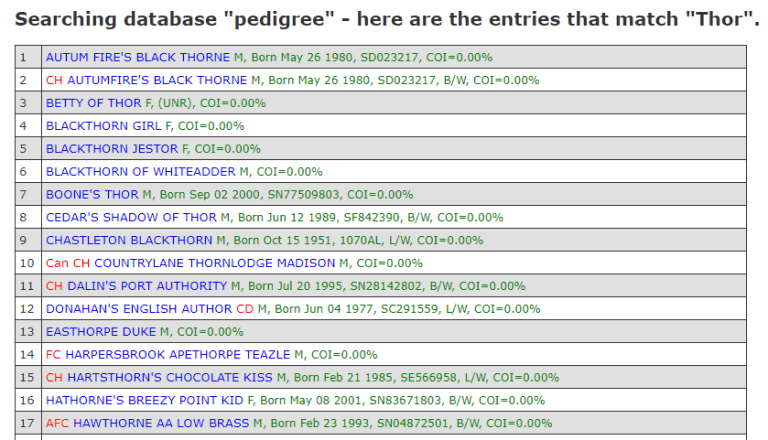
Understanding Your Search Results
Once you perform a search, you will receive a list of matching results. Each name includes multiple display options to explore detailed lineage and related information:
Pedigree – A traditional pedigree chart displaying ancestry.
Vertical Pedigree – A structured view of lineage with emphasis on generational depth.
Siblings – A list of littermates and full or half-siblings.
Offspring – A record of the dog’s progeny.
Reverse Pedigree – Traces descendants rather than ancestors.
External Pedigree – Links to additional pedigree resources when available.
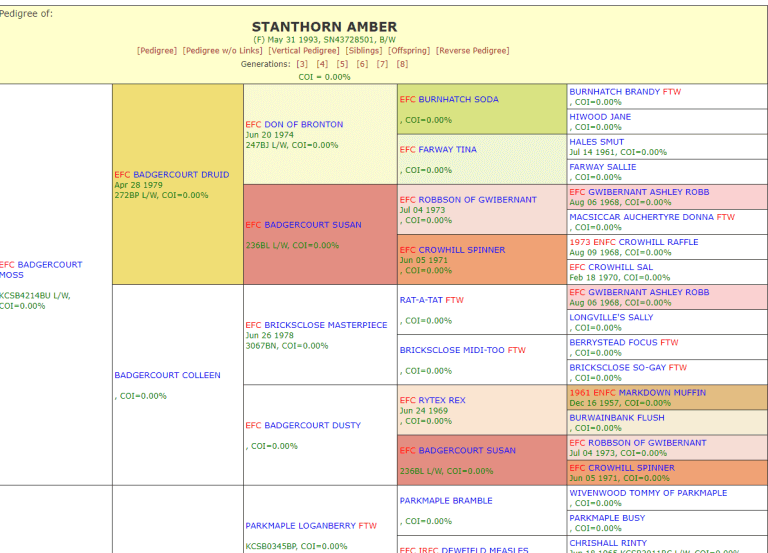
For this overview, the Pedigree link has been selected to demonstrate the next section.
5. Pedigree:
Pedigree Display and Customization
The pedigree view presents the number of generations you initially selected, but you have the flexibility to adjust this setting at any time.
Note: We are still refining color coding for conditions, so please disregard those at this time.